

Nowadays, Google Maps is no longer just an app for finding directions, but it has become a smart guide. Now, a new feature has been added to it Ask Maps AI, which helps you find better places by answering your questions. If you’ve ever wondered, Which is a good café near me? or What are the best places to visit here?, you no longer need to search separately Ask Maps AI will give you suggestions directly.
In this article, we will explain in very simple and everyday language how you can use this feature and how it can benefit you.
What is Ask Maps AI and Why It Is Special
Ask Maps AI is a smart feature that uses artificial intelligence to understand your questions and provide accurate answers. Earlier, you had to search manually and choose from results, but now you can directly ask questions just like you would ask a person.
For example, if you visit a new city and want a good restaurant, you can simply type or say, Which is a good family restaurant here? and Maps will show options based on your preferences.
This feature is special because it not only shows locations but also understands your needs and gives relevant suggestions.
How Ask Maps AI Works
When you use Ask Maps AI, it understands your query and shows results based on your location, ratings, reviews, and trending places. This means you get more accurate and useful information.
This feature is especially helpful for people who are in a hurry or do not like doing complicated searches.
How to Enable Ask Maps AI in Google Maps
If you want to use this feature, first make sure your Google Maps app is updated. You can update it from the Play Store or App Store.
After that, when you open the app, you will see an option like Ask AI or Ask Maps near the search bar or at the bottom. Sometimes, this feature is directly integrated into the search bar.
If you do not see this feature yet, it may not have been fully rolled out in your region, so you might need to wait for some time.
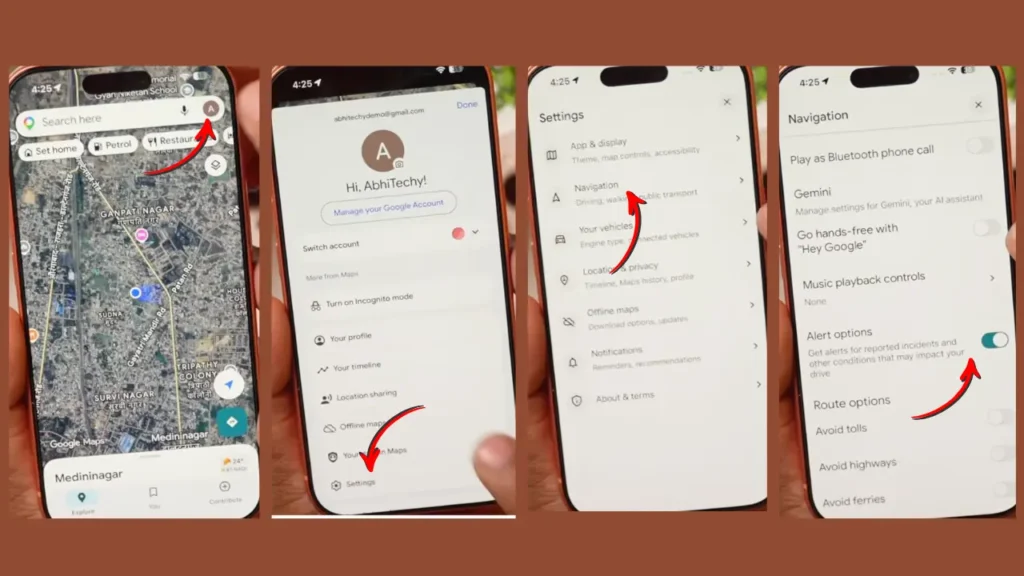
How to Use Ask Maps AI
Once this feature is available on your phone, using it is very easy. Just open Google Maps and go to the Ask Maps AI section.
Now, you can type your question or tap the microphone icon to speak. As soon as you ask your question, the AI will instantly generate results for you.
You will not only get a list of places but also detailed information like ratings, distance, opening hours, and user reviews.
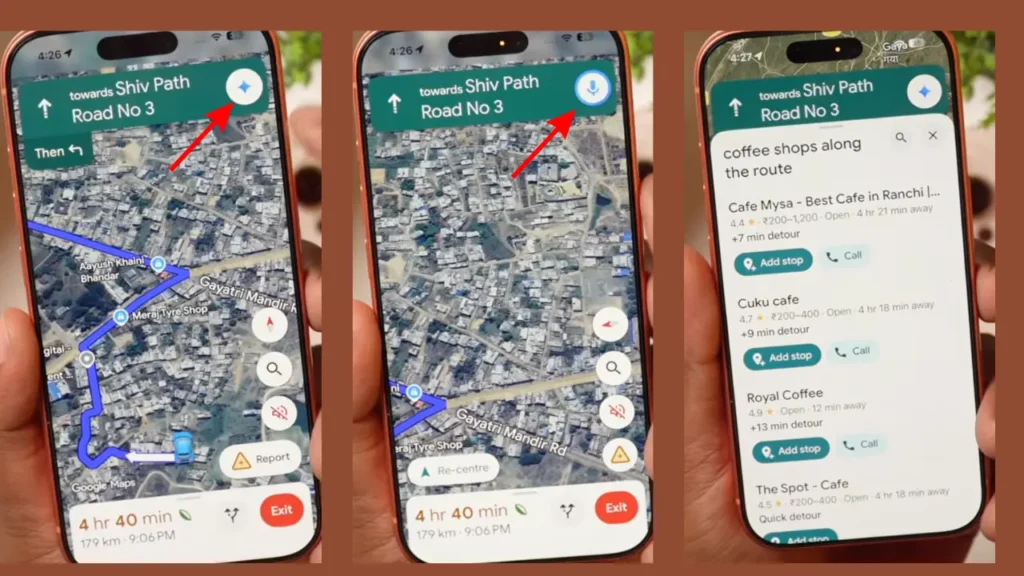
What You Can Ask Ask Maps AI
This feature is quite smart, and you can ask many types of questions. For example, if you are looking for food, you can ask, Where can I find the best street food here? or Which is a good café for couples?
If you are searching for places to visit, you can ask, What are the best places to visit near me? or What is best for a weekend trip?
You can even ask based on your needs, such as Where can I find a good budget hotel?
Benefits of Ask Maps AI You Should Know
The biggest advantage of this feature is that it saves your time. You don’t need to search multiple times just ask one question and get your answer.
Another benefit is that you get more personalized results, meaning you see places that are more relevant to you.
The third advantage is that it is very easy to use. Even if you are not very familiar with technology, you can still use it without any difficulty.
How Useful Ask Maps AI Will Be in the Future
Looking at how technology is growing, it is clear that Ask Maps AI will become even smarter in the future. It will remember your preferences and give suggestions accordingly.
In the coming time, this feature can make your travel planning even easier. You just need to say what you want, and your plan will be ready.