
In today’s time, our mobile phone is no longer just a device for making calls or sending messages; it has become a place where many important parts of our life are stored. Many times, our old SMS contain banking details, OTPs, important conversations, or special memories. But when we buy a new phone or accidentally lose data, the biggest question that comes to mind is How to get old SMS back? If you also have this question, then this article is going to be very useful for you.
What is SMS Backup and Why is it Important
SMS backup means saving your phone messages in a safe place so that they can be restored whenever needed. Many people ignore it, but when the phone gets damaged or data is accidentally deleted, its importance becomes clear.
If you have an SMS backup, you can easily restore your old messages to a new phone anytime. This not only saves your time but also keeps your important information safe.
How to Take SMS Backup on Android Phone
Taking an SMS backup on an Android phone is quite easy. You don’t need much technical knowledge for it.
First of all, you need to be logged in with your Google account on your phone. After that, go to the phone settings and turn on the backup option. When you enable backup, your data (including SMS) automatically gets saved to Google Drive.
Apart from this, if you want more control, you can also use separate apps for SMS backup. These apps allow you to take manual backups and restore them whenever you want.
Easy Method to Take SMS Backup
If you are taking SMS backup for the first time, the steps given below will help you:
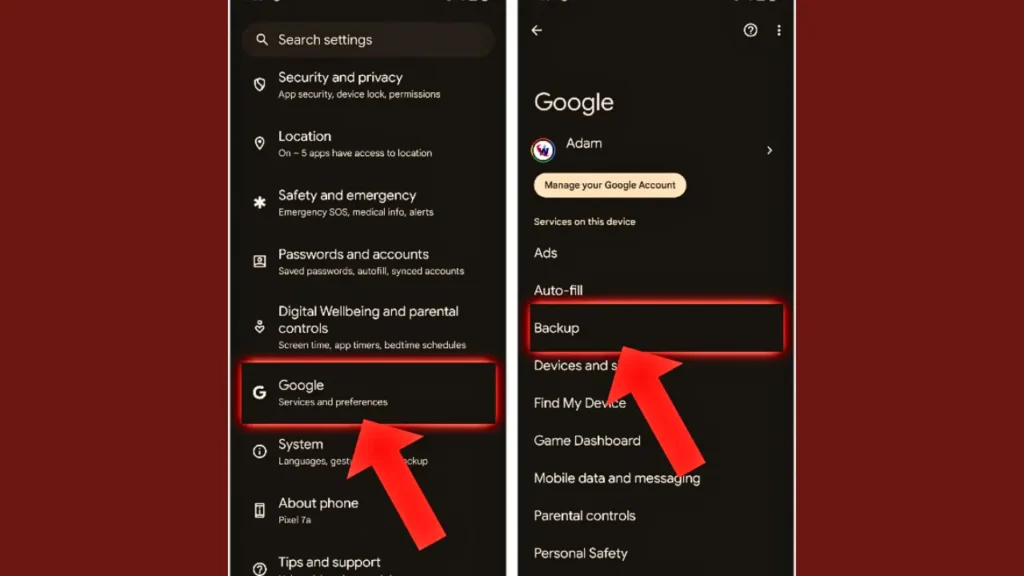
- First, open Settings on your phone
- Then go to Google or System
- There you will find the Backup option
- Turn on Backup to Google Drive
- Now click on Back Up Now
As soon as you do this, your phone data will be secured, including your SMS.
How to Restore Old SMS to a New Android Phone
When you buy a new phone, bringing back your old messages is very easy. For this, you just need to use the same Google account that you used for backup.
While setting up the new phone, when you log in with your Google account, you will see the Restore Data option. From here, you can choose the backup of your old phone. As soon as you select it, your SMS, contacts, and other data will be restored to the new phone.
If you have already set up your phone, you can still reset it and restore data during the setup process.
Using Apps for SMS Backup and Restore
If you want a more secure or separate backup, SMS backup apps can be a better option. These apps allow you to save messages in XML files or on the cloud.
Using these apps is also very simple. You just need to install the app, then click on Backup. After that, you can choose where you want to save the backup phone, email, or cloud.
When you need to restore SMS, go to the same app and click on the Restore option, and all your old messages will come back.
Things to Keep in Mind While Taking Backup
While taking SMS backup, it is very important to keep some things in mind so that you don’t face any problems later.
First, make sure your internet connection is working properly because the backup is saved in the cloud. Also, keep your Google account details safe because you will need them to restore your data.
It is also important to take backups regularly so that your new messages are also saved. If you don’t take backups for a long time, your recent data may be lost.
What to Do if SMS Gets Deleted
Sometimes, we accidentally delete SMS and regret it later. In such a case, if you already have a backup, you can easily restore them.
But if there is no backup, then it becomes difficult to recover SMS. Some apps and software claim to recover deleted data, but they are not always successful.
That is why the best way is to always keep a backup of your SMS in advance.