
In today’s time, a big part of our life is stored in our mobile phones especially in chat apps. Conversations with friends, family messages, important documents, photos, and videos we share everything on WhatsApp. In such a situation, one important question arises: is all this information really safe?
Just imagine if your phone gets lost or someone tries to access your data can they read your chats? To solve this concern, WhatsApp keeps introducing new security features from time to time. Now, it has introduced a new and advanced feature password and passkey-based encrypted backup.
In this article, we will understand in simple language what this feature is, why it is important, and how you can use it.
What is WhatsApp Backup Encryption?
When you create a backup of WhatsApp, your chats get saved on cloud services like Google Drive or iCloud. Earlier, these backups were not considered completely secure, because if someone got access to your account, they could also view your backup.
But now WhatsApp has introduced end-to-end encrypted backup. This means your backup is locked with a special code or security system, and only you can unlock it.
How to Secure WhatsApp Backup with a Password?
If you want to keep your WhatsApp backup completely safe, you can use a password. This method is very simple and available to every user.
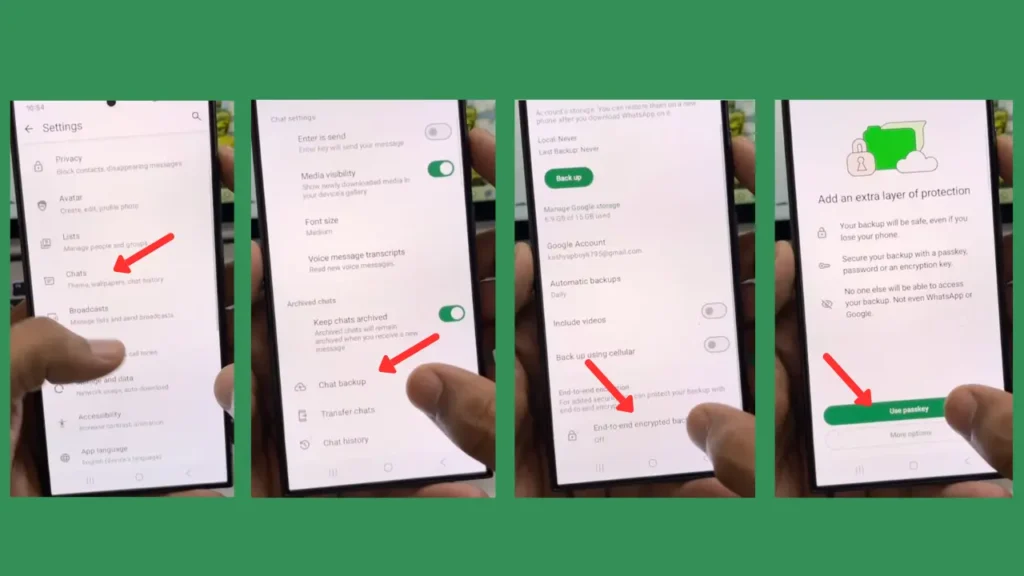
First, open WhatsApp and go to settings. There, you will find the Chats option. After clicking on it, you will see Chat Backup. In this section, you will find the End-to-end encrypted backup feature.
When you turn it on, you will get the option to create a password. Here, you need to set a strong password that includes letters, numbers, and special characters. Once the password is set, your backup becomes fully secure.
One important thing to remember is that if you forget this password, it may become very difficult to access your backup again. So always keep your password saved safely.
What is a Passkey and How Does It Work?
Now let’s talk about a newer and more secure method called Passkey.
Passkey is a system where you don’t need to remember any password. It works based on your phone’s security system, such as fingerprint, face lock, or screen lock.
When you use a Passkey, your WhatsApp backup becomes linked to your device. This means even if someone gets access to your account, they still cannot open the backup without your device’s authentication.
This feature is especially helpful for people who often forget passwords or want higher security.
How to Secure WhatsApp Backup Using Passkey?
Setting up a Passkey is also very easy. The process is almost the same as setting a password.
Go to WhatsApp settings, then Chats, and then Chat Backup. Turn on End-to-end encrypted backup. After that, you will see the Passkey option.
Now you can choose your phone’s security method, such as fingerprint or face scan. Once you set it up, your backup will be protected with device based security.
The biggest advantage is that you don’t need to remember anything, and your data remains highly secure.
Why is Passkey More Secure?
If we compare, Passkey is considered much safer than traditional passwords.
First, passwords can be stolen or leaked, but Passkeys stay securely on your device. Second, it is very difficult to hack because it is not stored on any server.
Third, and most importantly, it is very easy to use. You just unlock your phone, and your backup can be accessed securely.
That’s why many big tech companies are now adopting Passkey systems.
How to Make Your WhatsApp Even More Secure?
Backup encryption alone is not enough. You should also follow some additional steps to keep your data completely safe:
- Always turn on two factor authentication (2FA) in WhatsApp
- Avoid clicking on unknown links
- Keep your phone updated with the latest software
- Be careful while logging in on a new device
These small precautions can protect you from major cyber threats.
Is This Feature Available for Everyone?
New WhatsApp features are rolled out gradually to all users. If you don’t see the Passkey option yet, there is no need to worry. It will reach your app through an update soon.
Until then, you can secure your backup using a password or a 64-digit encryption key.


Hi
Vikram hhhggggh