
In today’s time, a mobile phone is not just a device but an important part of our life. It contains our photos, contacts, important documents, banking apps, and a lot of personal information. In such a situation, if the phone gets lost or stolen, it is natural to feel worried. But now you don’t need to panic much, because technology has provided an easy solution for this as well.
If your mobile is lost, you can easily find it using features like Find Hub and Find My. In this article, we will explain in very simple language how you can track your phone using these tools.
What is Find Hub and How It Works
Find Hub is a platform that helps you track the location of your mobile phone. It works by connecting your phone’s GPS, internet, and your account. Whenever your phone is turned on and connected to the internet, it can show its location.
The best part is that you can log in from another mobile or computer to find your phone. Not only this, but you can also lock your phone, display a message on it, or even delete all its data if needed.
What is Find My
Find My is a feature specially designed for Apple devices. If you have an iPhone or iPad, this feature is very helpful in tracking your device. It is connected to your Apple ID, and as soon as your phone connects to the internet, its location becomes visible.
With this feature, you can ring your phone, lock it, or even enable Lost Mode.
How to Find a Lost Android Phone Using Find Hub
If your Android phone is lost, you can easily find it using Find Hub (or similar features like Google Find My Device). For this, it is necessary that your phone was already logged in with your Google account.
- Open a browser on another phone or computer.
- Go to the Find Hub or Google Find My Device website.
- Log in using the same Google account that was used on your lost phone.
- After logging in, you will see a map showing your phone’s location.
- If the phone is turned on and connected to the internet, you will see its exact location.
- If the phone is switched off, you will see its last known location.
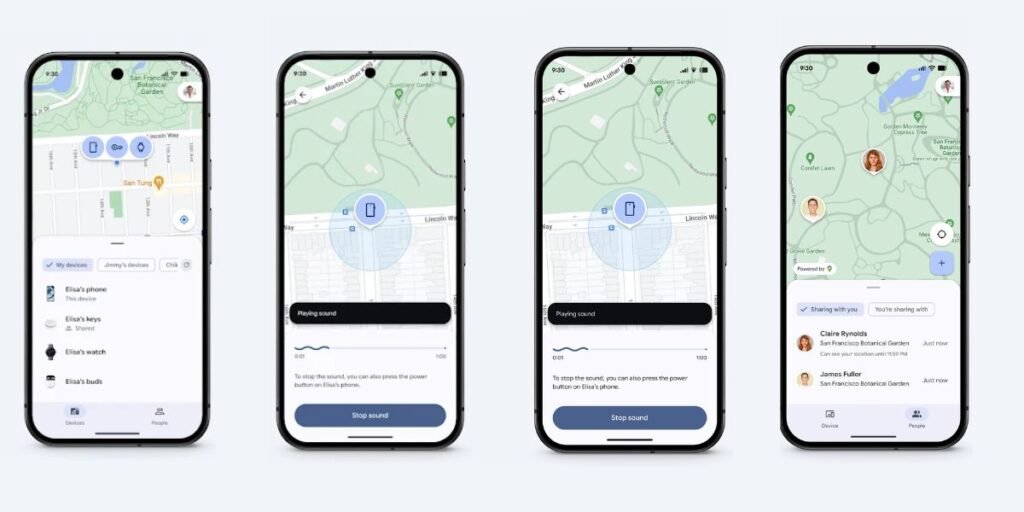
- You can now choose options like Play Sound, Secure Device, or Erase Device if needed.
How to Ring, Lock, or Erase the Phone
Once you get your phone’s location, you also get some important options to keep your data safe.
If you think your phone is somewhere nearby, you can use the Play Sound option. This will make your phone ring loudly, even if it is on silent mode.
If you suspect that your phone is in someone else’s hands, you can choose the Secure Device option. This will lock your phone, and you can display a message on the screen like This phone is lost, please contact this number.
The last and most important option is “Erase Device.” If you feel that getting your phone back is difficult, you can delete all its data to protect your personal information.
How iPhone Users Can Find Their Phone Using Find My
If your iPhone is lost, the Find My feature will be very helpful.
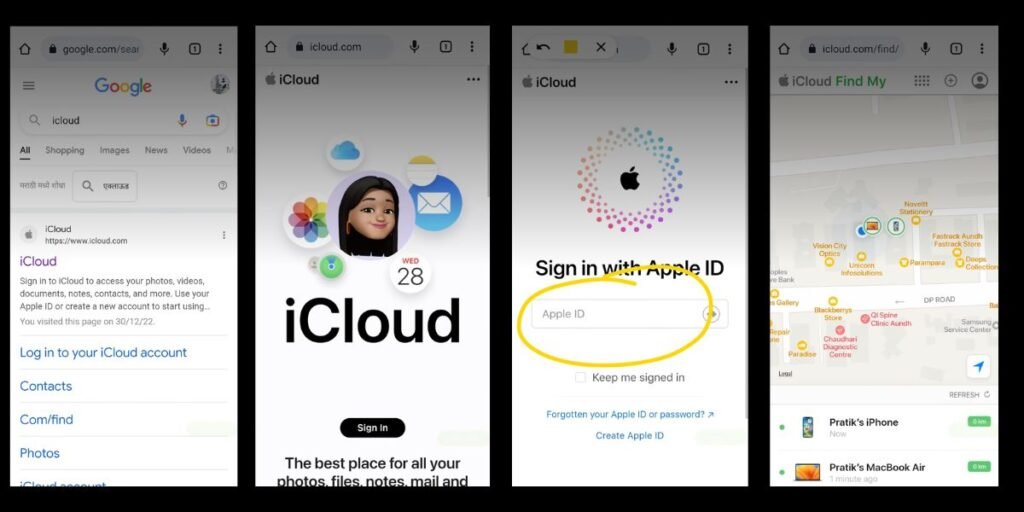
- For this, open iCloud on another Apple device or in a browser and log in with your Apple ID.
- After logging in, click on the Find My option.
- You will see a list of all your devices.
- Select your lost iPhone from the list.
- A map will appear showing your phone’s location.
- If the phone is nearby, tap on Play Sound to locate it.
- If the phone is far away or stolen, enable Lost Mode.
- Once Lost Mode is enabled, your phone will be locked.
- You can also display a message and your contact number on the screen.
What to Do If the Phone is Switched Off
Sometimes the phone may be switched off or its battery may be dead. In such cases, getting a live location becomes difficult. However, you can still see the last known location, which gives you an idea of where the phone was lost.
In such situations, you should immediately block your number and change the passwords of your banking apps so that no one can misuse your data.
Important Things to Keep in Mind Before Tracking
Your phone can only be tracked if some important settings were already enabled. For example, location (GPS) should be turned on, the phone should be connected to the internet, and your Google or Apple account should be logged in.
Also, Find My Device or Find My feature must be enabled beforehand. If all these things are properly set, finding your phone becomes much easier.
How to Prevent Losing Your Phone in the Future
Losing a phone is common, but with a little caution, it can be avoided to a great extent. First of all, always keep a screen lock on your phone, whether it is a PIN, password, or fingerprint.
You should always keep location and tracking features turned on. Also, take regular backups of your data so that even if the phone is lost, your data remains safe.
If you travel frequently, keep an emergency contact saved on your phone so that someone can reach you if needed.