
Nowadays, smartphones are not limited to just calling and messaging, but they have become a smart companion that works with your voice. You must have often seen iPhone users saying Hey Siri and getting their work done. Just one command and the phone sends messages, makes calls, or tells the weather. In such a situation, Android users also wonder whether their phone has such a feature.
The answer is yes, absolutely! On Android phones, you can also use voice commands just like Hey Siri. For this, you need to use Google Assistant, which is already available on most Android devices.
Now let’s understand it in simple language so that you can also control your phone with your voice.
What is Google Assistant and How It Works
Google Assistant is a smart voice assistant developed by Google. It understands what you say and performs tasks for you. For example, if you say Call Mom, it will instantly make the call. If you ask What’s the weather today?, it will give you the information immediately.
It works just like Siri on iPhone. The only difference is that on Android, you activate it by saying Hey Google or OK Google.
How to Enable Hey Google Feature Like Siri On Iphone in Android
If you want your phone to respond to your voice, you need to do a simple setup. First, you have to turn on Google Assistant on your phone. If you want your phone to get activated by your voice, then you just need to follow some simple steps given below:
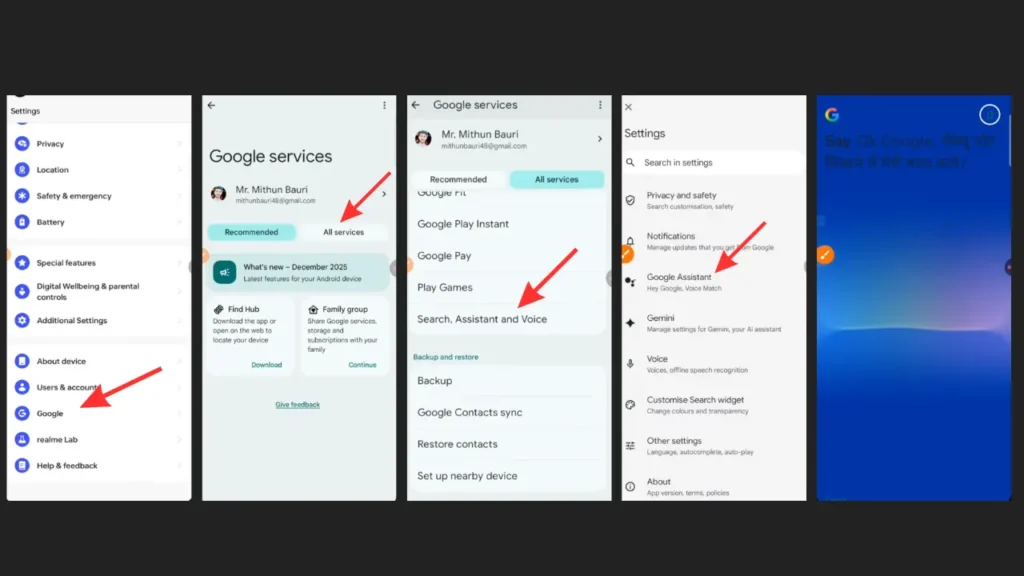
- First, open your mobile Settings and go to the Google option.
- Here, you will find the Google Assistant option, click on it.
- After that, go to the Hey Google & Voice Match section
- Now turn ON Hey Google, so that your phone can listen to your voice.
- After turning on Hey Google, you need to record your voice. Follow the on-screen instructions and say Hey Google 2–3 times.
- Once your voice is set, the Assistant will start recognizing your voice.
After completing this setup, you can activate your phone from anywhere by saying Hey Google or OK Google, even if the screen is locked.
Things to Keep in Mind While Setting It Up
When you set up Google Assistant for the first time, it asks you to say Hey Google a few times. This is important because it helps your phone recognize only your voice.
Make sure you speak clearly and naturally so that the Assistant can understand you properly. If your voice is not recorded correctly, it may cause issues later while using it.
What You Can Do with Google Assistant
Once this feature is enabled, your phone becomes truly smart. You can do many things without even touching it.
You can make calls, send messages, set alarms, play music, or get any information instantly from the internet. You can even control smart home devices using it.
This feature is especially useful when your hands are busy, like while cooking or driving. You can control your phone just with your voice.
What to Do If Hey Google Is Not Working
Sometimes, even after setting everything up, Hey Google may not work. There’s no need to worry just check a few things.
First, make sure your internet is on because Google Assistant needs an internet connection to work properly. Also, check if your Google app is updated.
If the issue still continues, you can reset your Voice Model. This will re-record your voice and may fix the problem.
Difference Between Hey Siri and Hey Google
In simple terms, both features are almost the same. On iPhone, you have Siri, while on Android, you have Google Assistant.Both work using your voice and provide a smart experience. The difference is mainly in the company and the name; the functionality is quite similar.
Some people prefer Google Assistant because it is connected to Google’s search data, which often gives more accurate information.
If you want to make your Android phone smarter, you should definitely use the Hey Google feature. It not only saves your time but also makes your tasks easier.


Varyy good